Introduction

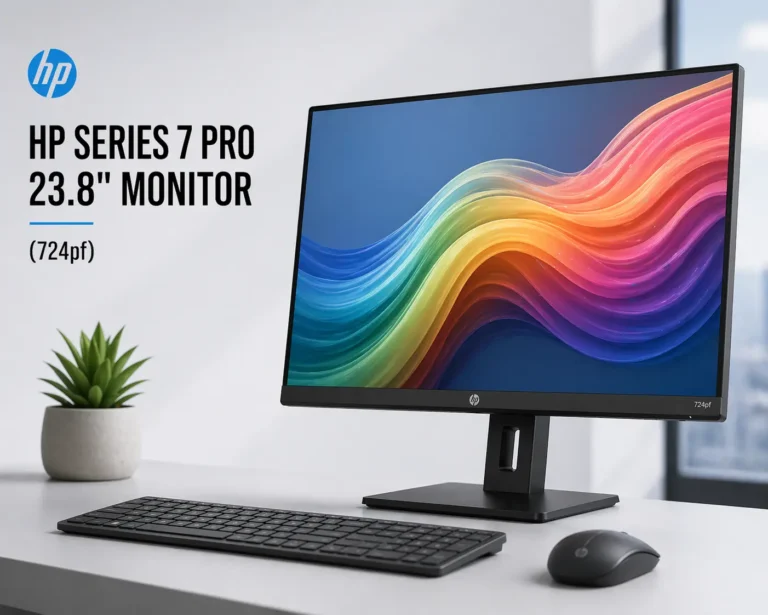
The function of display technology is to enhance the productivity and user experience of employees in the U.A.E.’s growing number of hybrid workplaces and high-efficiency digital environments. When connected to Janasys, the HP Series 7 Pro 23.8″ Monitor (724pf), more than an excellent monitor for professional users who require accurate colour reproduction, high-speed operation, and ergonomic support when working long hours, becomes part of a complete enterprise workspace ecosystem along with their computer, server and collaboration tools.

Introducing the HP Series 7 Pro 724pf 23.8″ FHD IPS Monitor:

• Let’s Fibre Technologies + others
The HP Series 7 Pro 724pf is a business-class monitor specifically built for:
• Office productivity.
• Design and content workflows.
• Multi-screen configurations.
• Hybrid workspaces.

The Main Features of this Product Include:

1. Accurate Colour Performance – 99% sRGB/85% Display P3: Factory calibrated Delta E <2, and the same appearance (colour) will be experienced by consumers regardless of which device they are using.

2. Smooth Visual Experience (from 100Hz to 5ms) – Ideal for: Scrolling, watching video files, working on heavy data files.

3. Full HD IPS Display – 23.8 inch/1920×1080 pixel display with 178° viewing angles.

4. Enhanced Contrast and Brightness – 1500:1/300 nits of brightness for better depth of colour and detail.

5. Ergonomic Design – Supports height adjustment of 150mm, tilt, swivel, and pivot to minimize eye strain when working long hours.

6. Eye Comfort Technology – Low blue light (HP Eye Ease) and TÜV certified to reduce eye strain while maintaining colour accuracy.

Technical Specifications:

Specification Details
Screen Size 23.8 inches
Resolution Full HD (1920 × 1080)
Panel Type IPS
Refresh Rate 100Hz
Response Time 5ms
Brightness 300 nits
Contrast Ratio 1500:1
Color Gamut 99% sRGB, 85% DCI-P3
Ergonomics Height, Tilt, Swivel, Pivot
Ports HDMI, DisplayPort, USB Hub

Monitor Configuration/Use Cases:

Please refer to the list below for all monitor configurations and use cases:

  • Single standard monitor configuration – best for standard office type work (people that typically do standard office work typically include HR personnel, finance department employees, administration personnel, etc.).
  • Standard dual monitor configuration – best for people who generally have multiple applications open at once (may include developers, analysts, and marketing personnel).


Configuration usage on an Enterprise Workspace combined with a HP desktop or workstation, along with Docking Station(s) and Server infrastructure.

Janasys successfully delivers these products.

HP Series 7 Pro 23.8" Monitor (724pf)

Detailed Monitor Solution Overview:

1. Productivity advantages through multi-window workflow with virtually no lag due to the 100Hz refresh rate technology, as well as improved eye usability due to the technology focused on eye comfort.

2. Professional Visual Accuracy (Color calibration) – Most designers, content creators, and marketing teams require accurate representations of colors.

3. Office Deployment Scalability (Cloud exposure). Available configurations are at the single desk level/team set-ups/all enterprise environments.

4. Designed with a clean and minimalist desk appearance; ultra-thin 4-sided micro-edge bezel with a maximum display area, supports “Daisy Chain” for multiple monitor configurations (daisy chaining means using the same Kensington-style cable to connect multiple displays together).

Monitor Pros & Cons:

Pros:

  • Exceptional color accuracy (factory calibrated)
  • Very smooth 100Hz refresh rate technology
  • Excellent ergonomic design
  • Excellent for multi-monitor configurations
  • Enhanced eye comfort when using the monitor for long periods of time

Cons:

  • The maximum resolution of the monitor is full HD, not 2K/4K
  • No integrated webcam
  • Not developed to perform well when gaming, as well as those who perform heavy workload-type tasks.

Target Markets

Target Businesses:
Corporations / MNCs
Information Technology
Corporations

Other Target Businesses:
Freelancers & Remote Workers
Agencies Engaging in Design or Marketing

Purchasing Decision-Makers:
Corporate IT Managers
Corporate Procurement Managers
Corporate Owners

A1. Yes, it was developed for long working hours and business productivity.

A2. Yes, you can use up to three monitors with this monitor

A3. Yes, this monitor provides incredible accuracy and colours that reproduce well with many different devices.

A4. Yes, HP's low blue light technology allows for a more comfortable viewing experience.

A5. Yes, but the primary purpose of this monitor is to support productivity, not to play video games.

 

Leave a Reply

Your email address will not be published. Required fields are marked *