Introduction
In today’s UAE business environment, a hybrid working setup that supports enterprise productivity requires modern companies to have high-quality, high-resolution displays with fast, reliable connectivity, as well as features that maximise worker productivity in this new working setup.
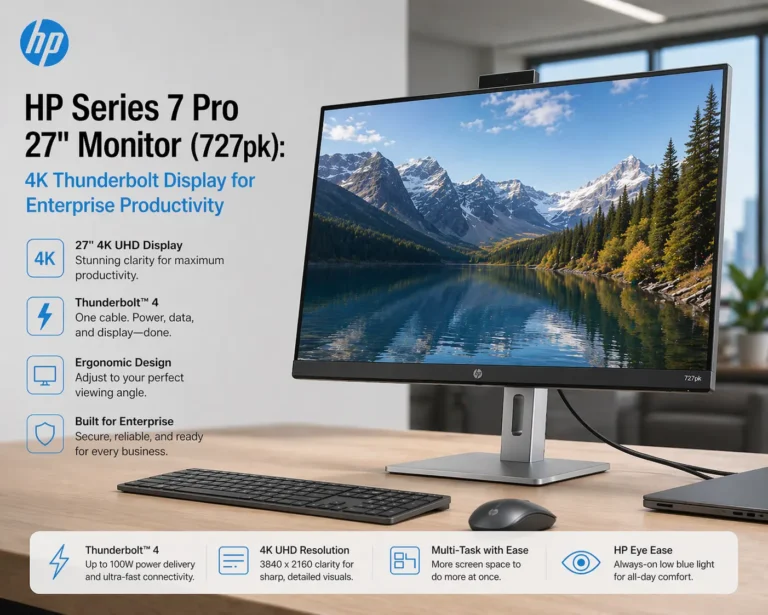
The HP Series 7 Pro 27″ Monitor (727pk) is a premium 4K Thunderbolt 4 display designed for use by professionals who need to have colour accurate images while multitasking and are looking for enterprise solutions to connect their devices as part of a complete IT setup, including workstations, servers, and collaboration devices via Janasys.
Designed for:
- Enterprise Productivity
- Creative Professionals
- Multi-Device Workflows
- Hybrid Working
- Environments
Key features:
1. A beautiful 4K Ultra HD Display. (3840 × 2160 resolution) – ultra-sharp quality with many pixels to provide a very high resolution to assist in detail-oriented activities, such as design and analysis
2. IPS Black Technology (enhanced contrast ratio) of ~2000:1, and produces deeper blacks, thus producing a more vibrant picture than a traditional IPS panel
3. Precision Colour Accuracy (100% sRGB / 98% Display P3) and Pantone validation, and factory calibration for colour accuracy.
4. Thunderbolt™ 4 (one cable for Video / Data / Power Delivery (up to 100 watts) to reduce cord/cable clutter and improve work station efficiency and ergonomics.
5. KVM (Keyboard Video Mouse) Functionality – allows you to control multiple devices with one keyboard/mouse and is ideally suited for multi-tasking and IT professionals.
6. Ergonomic and Eye Comfort – HP Eye Ease (low blue light) – TÜV certified and – Adjustable stand (Height / Tilt / Swivel and Pivot).
Technical Specifications
| Specification | Details |
|---|---|
| Screen Size | 27 inches |
| Resolution | 4K UHD (3840 × 2160) |
| Panel Type | IPS Black |
| Contrast Ratio | 2000:1 |
| Response Time | 5ms |
| Color Gamut | 100% sRGB, 98% DCI-P3 |
| HDR | DisplayHDR 400 |
| Connectivity | Thunderbolt 4, HDMI, DisplayPort, USB Hub |
| Special Feature | KVM switch, Daisy chaining |
Setups & Integration/Utilization
Single Monitor Installation
Target Users:
Executives
Financial Analysts
Business Users
Double Monitor Installations
Target Users
Developers
Graphic Designers
Marketing Teams
Enterprise Installations
Integrated With:
Work Station
Server
Docking Stations
Installed Via Janasys for complete IT infrastructure integration
Complete Solution Overview
1. Optimal Worker Productivity
4K Resolution Provides:
Multi-Window Usage
Increase in Multi-Tasking Ability
Less Window Changeover For Quick Access
2. Multi-Device Workflow
KVM Technology Allows:
Switching between Operating Systems (Multiple Systems)
Easier Multi-Device Management
3. Clean Desk Environment
Thunderbolt 4 Provides Less:
Cable Clutter
Docking Station Requirements
4. Improved Creatives Workflow
Color Accuracy for:
Designers
Video Editors
Content Producers
Advantages & Disadvantages
Benefits:
- Fantastic 4K Clarity
- Improvement in IPS Image
- Quality (Black Contrast)
- Can Be Used for Thunderbolt 4 Docking
- Excellent Color Accuracy
- Enterprise Use Connectivity
Drawbacks:
- Premium Pricing
- 60 Hz Refresh Rate (Not for Gaming)
- No Built-In Speakers or Webcam
Why Janasys?
Janasys Offers:
- Enterprise Dedicated Purchasing
- Custom Configuration
- Deployment and Set-up
- Integration with:
Servers
Network
Workstations
Complete IT Ecosystem for Businesses in the UAE
Yes, it has been engineered to provide high productivity in enterprise/business/freelance as well as support to all types of creative workflows.
Yes, you can because there is an included KVM switch to allow you to switch between multiple devices using the Thunderbolt ports.
Yes, because they'll have very high color accuracy and calibration with the monitor.
Yes, the Thunderbolt 4 will deliver up to 100 watts of power delivery to any device connected through USB-C.